
AI agents and agent infrastructure on LUMI
4 mins read
AI coding agents like Claude Code and OpenAI Codex have become popular tools for coding on LUMI. When used responsibly, they can lower the barrier to entry for new users and speed up everyday work for experienced ones. To help users get the most out of agents, we have released the new LUMI AI agent guide.
The guide covers different aspects of agent usage, such as best practices, relation to the LUMI Terms of Use, as well as the user’s responsibilities. These are required reading for all LUMI users who use agents, since the user who starts an agent is ultimately and unequivocally accountable for it.
In addition to this guidance, we provide the initial version of our LUMI AI Factory AI agent infrastructure. The agent infrastructure currently comprises two components. The LUMI AI Factory agent environment is a containerised environment that allows users to run AI coding agents on LUMI securely and with sensible defaults. The LUMI AI Factory MCP (Model Context Protocol) server can be connected to any AI agent to provide it with additional context about LUMI, which allows agents to give more accurate answers grounded in LUMI’s user documentation.
Agent environment
The LUMI AI Factory agent environment is a containerised environment that allows users to run AI coding agents more securely and effectively on LUMI. Currently, we provide a container for using the open-source, terminal-based OpenCode AI coding agent. For more information on using OpenCode, see the blog post on connecting OpenCode to a vLLM instance running on LUMI.
The LUMI-specific configuration files included in the agent environment transform OpenCode into a capable AI assistant for using LUMI, but users should remember to follow the LUMI AI agent guide and read the agent environment’s documentation to understand potential risks before using it.
Using OpenCode as an AI assistant for LUMI
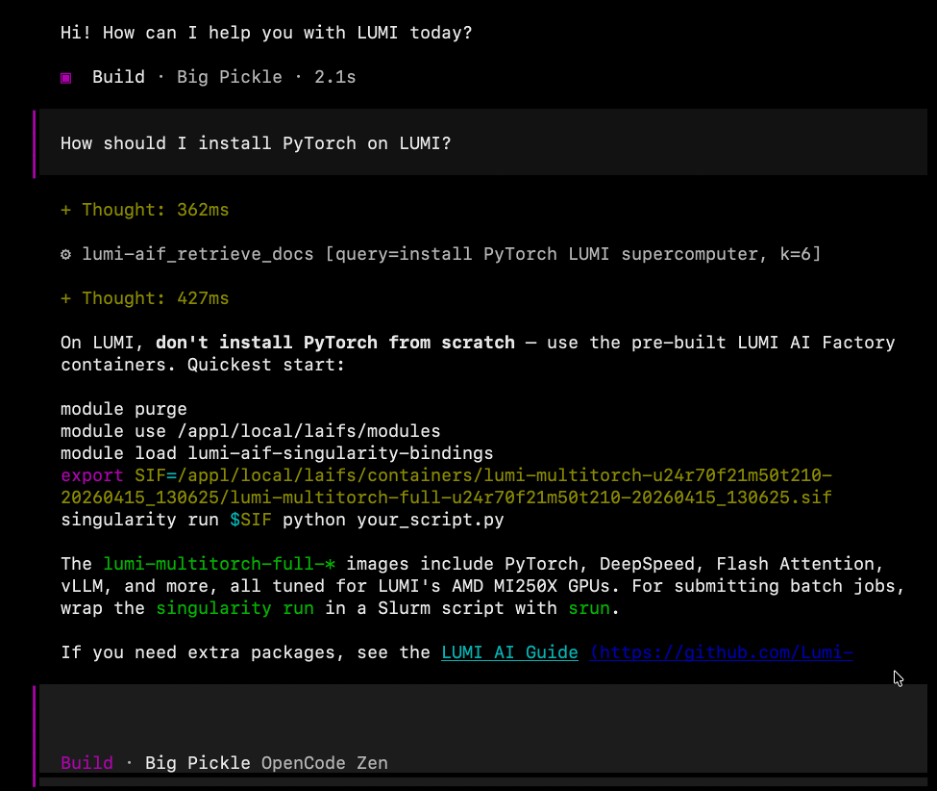
We demonstrate the usefulness of the agent environment using a practical example. Making use of the LUMI-specific configuration included in the environment, we ask the agent how to install PyTorch on LUMI. Rather than, e.g., erroneously walking us through a manual installation, the agent, using the LUMI AI Factory MCP server, correctly refers us to the LUMI AI Factory AI software environment, which is exactly the guidance a beginning user should be presented with. Using this same setup, we may also draft Slurm scripts or ask questions about different aspects of the LUMI. As with any AI tool, the outputs of the agent should always be validated against the LUMI documentation.
MCP server
The LUMI AI Factory provides a public Model Context Protocol (MCP) server. The LUMI AIF MCP server features a tool called retrieve_docs, which allows agents to search a regularly updated knowledge base of LUMI documentation and the LUMI AI Guide. The search functionality is implemented using an embedding model that is run locally on the MCP server host.
Access to this tool allows AI agents to, e.g., answer questions about LUMI with greater accuracy and write code that takes into account LUMI’s particular system architecture and software environment. You can find more about the server in the LUMI documentation, including how to add it to a local software development environment like VSCode, OpenCode, Claude Code or Codex.
Are you an industry user and need more in-depth support? Check out our blogpost on consulting. If you want more information on why to use supercomputing and LUMI, check out this blogpost.
Read also other blogs in the series:
What is LUMI AI Factory’s Artificial Intelligence expert consultation?
Trustworthy AI: Turning compliance into competitive advantage
Local agents, remote brains: connecting OpenCode to LUMI
Written by

Mitja Sainio
Junior Application Specialist at LUMI AI Factory

Marlon Tobaben
Machine Learning Specialist at LUMI AI Factory